

Operations
Restart a Crashed Service Automatically With systemd
Two lines make systemd restart a crashed service. Here is the start limit that quietly stops it, the failures it cannot see and how to hear about restarts.
By Techie Gain4 min read
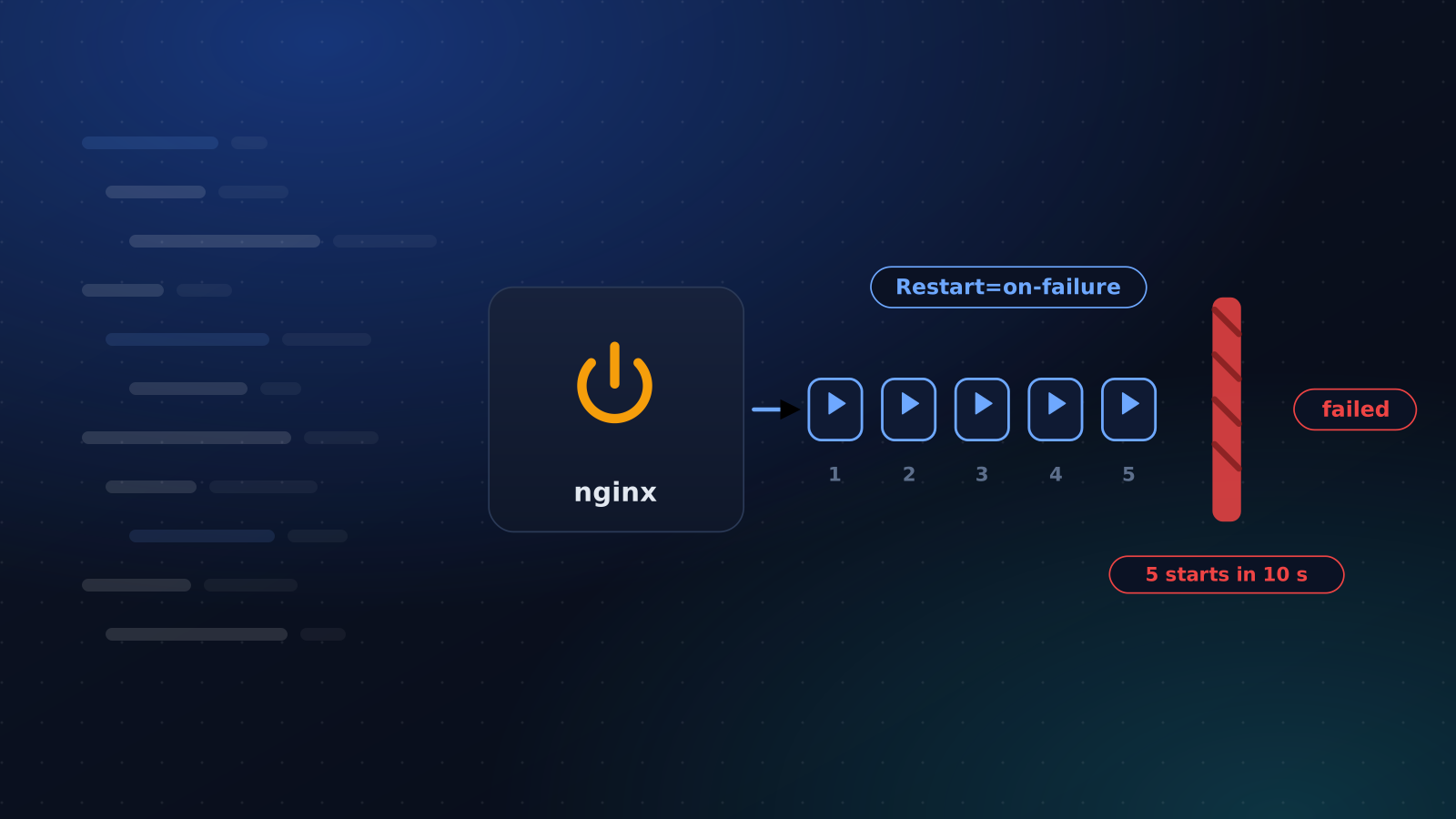
Two lines of configuration turn a 3 a.m. page into a line in a log. They also hide things, and they have a limit most people discover the hard way.
The two lines
Do not edit the package's unit file, because the next upgrade will overwrite it. Create a drop-in instead:
bash
sudo systemctl edit nginxand put this in the file it opens:
ini
[Service]
Restart=on-failure
RestartSec=5s
on-failure restarts the service when it exits with an error, is killed by a signal, or times out. It leaves a clean exit alone, and it does not fight systemctl stop, so stopping a service on purpose still works. always restarts it in every case, including after a clean exit, which suits a worker that should never end and surprises you with anything else.
systemctl edit reloads the configuration when you save. Confirm what systemd will use with systemctl cat nginx, which prints the unit with your drop-in underneath it. If you ever edit a unit file by hand instead, run systemctl daemon-reload yourself, or the old settings stay in force and nothing tells you.
Set RestartSec. The default is 100 milliseconds, and a service that fails instantly will go round the loop ten times a second, filling the journal and the CPU while it does.
The limit that stops it
systemd refuses to start a unit more than five times in ten seconds. Past that it gives up. The unit goes to failed, the journal says "Start request repeated too quickly", and it stays down until somebody looks. We reproduced it on Ubuntu 24.04 and Debian 12 with a service that exits immediately: five restarts, then nothing.
With RestartSec=5s you will rarely reach the default window, because each attempt is five seconds apart. If you want a deliberate cap, set it, and put the keys in the right section:
ini
[Unit]
StartLimitIntervalSec=10min
StartLimitBurst=5
In the [Service] section systemd ignores them with a warning, which is where a lot of older advice online will have you put them. To bring a unit back after it hits the limit, run systemctl reset-failed nginx and then start it.
A worked example for your own application
A Python or Node service you wrote yourself is where this matters most, because nobody packaged it for you. A unit file for it can be this small:
ini
[Unit]
Description=Shop API
After=network.target

[Service]
User=shop
WorkingDirectory=/srv/shop
ExecStart=/srv/shop/venv/bin/gunicorn app:app
Restart=on-failure
RestartSec=5s

[Install]
WantedBy=multi-user.target
It runs as its own unprivileged user, starts after the network is up and comes back five seconds after a crash. Enable it with sudo systemctl enable --now shop, and journalctl -u shop holds everything it prints, with no log file to rotate.
What a restart cannot see
A service that has hung is still "active (running)" as far as systemd knows. Nothing exited, so nothing restarts. For that you need one of three things: WatchdogSec= with a service that reports in over sd_notify, which nginx does not; a health check that restarts the unit when a request fails; or a monitor outside the machine that notices the page is gone and has permission to act.
A restart also cannot see a memory leak, and it hides one. A process that grows for three days and is killed by the OOM killer comes back every third day, and nobody ever finds out. The counter is there if you ask for it:
bash
systemctl show nginx -p NRestartsMake the restart visible
An automatic restart is a symptom that has been treated, not a cure. The failure that caused it is still happening, and the only difference is that you stopped hearing about it. Three habits help.
- Read
journalctl -u nginx --since yesterdayon a schedule, or ship those lines to wherever you read logs. - Put
NRestartson a dashboard and notice when it moves. - Use
OnFailure=to start a notification unit when a service lands in the failed state for good.
When not to do it
A database in the middle of crash recovery does not benefit from being restarted every five seconds. A service whose configuration is broken will fail the same way every time, so test the configuration before the start with ExecStartPre=/usr/sbin/nginx -t and let a bad file fail once, loudly. And a service that depends on another needs ordering with After= and Requires=, or it restarts into the same missing dependency.
Where this stops and monitoring starts
systemd handles the crash that happens in front of it. It does not know that the site is returning 502, that the disk is full, or that somebody stopped the process by hand and forgot.
Auto-Fix covers that layer. When an external check fails, it restarts stopped services, reloads PHP-FPM, clears package caches or reloads nginx after testing its configuration, holds the alert for about a minute, and then tells you what it tried. It never reboots a server, and it stops after three attempts a day on one monitor, because a fix that keeps being needed is a problem for a person.
If a restart keeps happening, the cause is often one of the usual disk and memory suspects. To decide which alerts deserve a person, read what to monitor on a Linux server.
Keep reading
Monitoring
Why Your Uptime Monitor Sends False Alerts
Your monitor says the site is down and it is fine. The usual causes, how to tell which one you have, and how to cut the noise without going blind.
4 min read
Monitoring
What to Monitor on a Linux Server
A short, opinionated list of what to watch on a Linux server, the thresholds worth alerting on, and what to leave out so alerts stay worth reading.
4 min read
Operations
Linux Disk Full: Find What Is Using the Space
df says full, df says free, or the numbers disagree. A calm order of checks for a full Linux disk: inodes, deleted files, journald, Docker and logs.
4 min read